Link-in-Bio Pages That Convert: Setup and Optimization Guide
Turn your link-in-bio into a high-converting hub. Learn what links to include, how to order them, design tips, tracking, and whether to use your own website.
On many social platforms, your bio link is one of the only clickable paths from your content to your business. Every profile visitor who taps it is curious about you. Yet many creators fill their link-in-bio page with a dozen equally weighted buttons, leaving visitors unsure where to go.
A well-designed link-in-bio page guides people toward the actions that matter most for your goals.
Key takeaways
- Put your single most important action at the top.
- Limit the number of links and use clear, benefit-driven labels.
- Track clicks and update the page as your priorities change.
Decide your primary goal
Before adding links, decide what you most want visitors to do. For most creators, the best primary goal is growing your email list, because it gives you a direct relationship with followers that no algorithm controls. Other common goals include selling a product, booking a service, or promoting a current launch.
What to include
- Primary call to action: newsletter sign-up, lead magnet, or current offer.
- Your main product or service.
- Latest or most popular content, such as your newest video or a cornerstone guide.
- Secondary offers, such as affiliate gear pages or other products.
- Brand partnerships contact for sponsors.
- Social icons at the bottom.
Five to seven links is usually plenty. More options often lead to fewer clicks on any single one.
Write labels that sell the click
Compare these:
| Weak label | Strong label |
|---|---|
| Newsletter | Get my free weekly growth tips |
| Shop | The Notion content planner I use (template) |
| Coaching | Book a 1:1 channel audit |
| Gear | Every tool in my filming setup |
Strong labels describe the benefit or exactly what the visitor will get.
Design tips
- Use a clear profile photo and short bio that restates who you help.
- Make the primary link visually different, such as a larger card or contrasting color.
- Keep branding consistent with your content.
- Check mobile load speed; most visitors are on phones.
- Embed a sign-up form directly on the page if your tool allows, removing a step.
Link-in-bio tools vs. your own website
Link-in-bio tools such as Linktree, Beacons, Stan, and similar services are fast to set up and often include analytics, storefronts, and email capture. Your own website gives you full control, better long-term SEO value, and no dependency on a third-party service.
Many creators use a simple page on their own domain, such as yourdomain.com/links, which keeps traffic on a site they own. Either approach works; what matters is a focused page you keep updated.
Track what’s working
- Use built-in analytics or add UTM parameters to links so you can see traffic sources in your website analytics.
- Compare click-through rate on each link monthly.
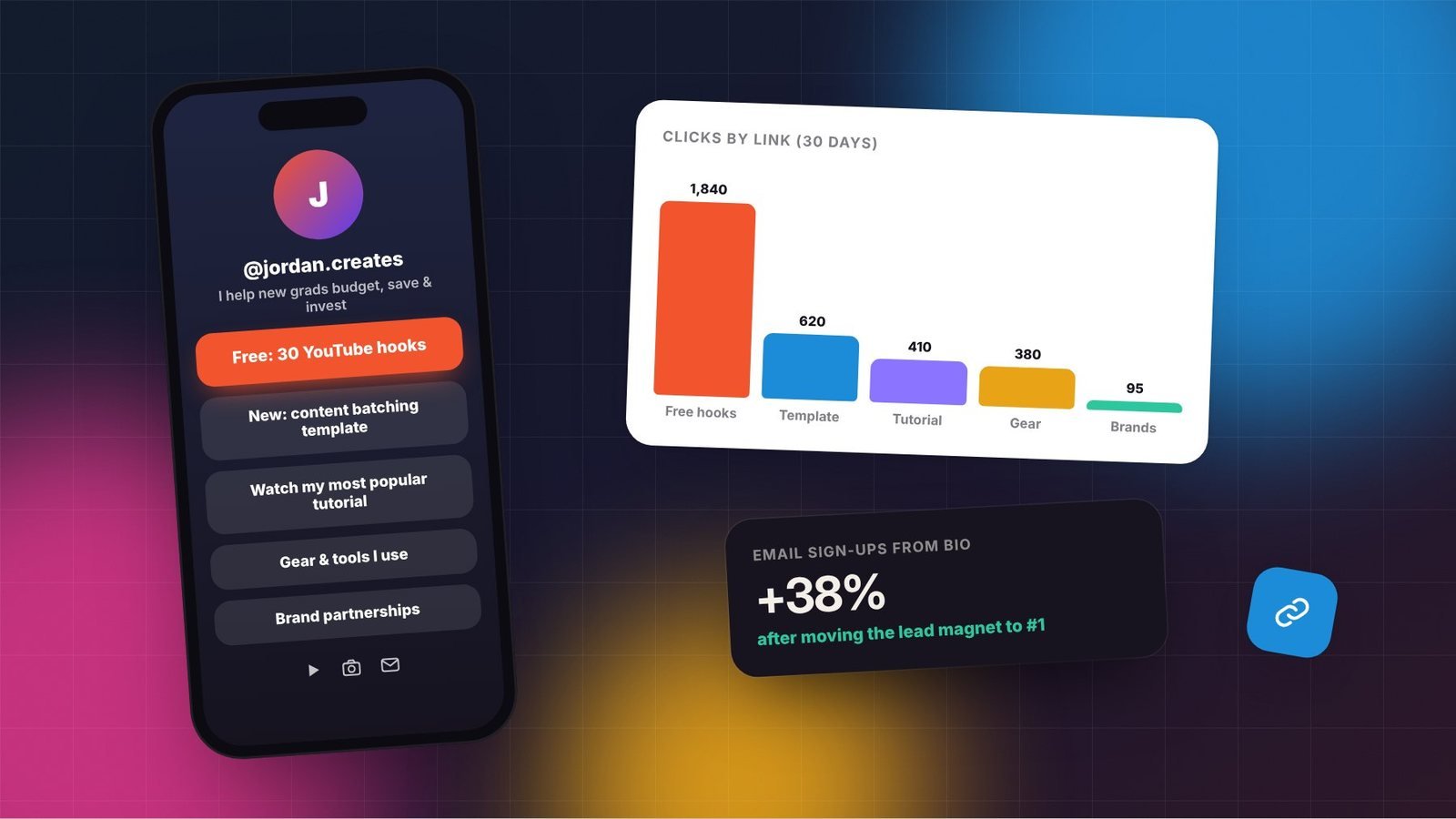
- Move high performers up and remove links nobody clicks.
- Test different labels for your primary call to action.
Drive more people to your bio
A great link page only works if people visit it. Mention specific resources in your content (“The template is linked in my bio”), use pinned posts explaining what’s there, and refer to your link page in Stories. Tie each call to action to the content: a video about planning should point to your planning template, not a generic list.
Keep it current
Outdated links, such as expired launches, deleted videos, or broken affiliate links, hurt trust. Review your link page monthly and update it whenever you launch something new. Rotate seasonal or time-sensitive offers to the top while they’re active, then move them down.
A sample optimized layout
- Featured card: “Free: 30 YouTube hooks that keep viewers watching” (email sign-up)
- “New: my content batching template”
- “Watch: my most popular tutorial”
- “Gear and tools I use” (with affiliate disclosure)
- “Brand partnerships”
- Social icons
Small improvements to this one page can meaningfully increase sign-ups and sales, because it sits at the end of every piece of content you create. For more on growing your list, see how to start a newsletter.
Frequently asked questions
How many links should be on my link-in-bio page?
Five to seven is usually enough. Fewer, clearer choices make it easier for visitors to take the action you care about most.
Should I use a link-in-bio tool or my own website?
Both work. Link-in-bio tools are quick and include analytics, while a page on your own domain gives you more control and long-term value. Choose the option you’ll keep updated.
What should my top link be?
For most creators, it should be an email sign-up or lead magnet, because it builds a direct relationship with followers. During a launch, you can temporarily feature the product.