Automations That Run Your Creator Business While You Sleep
Practical automations for creators: email sequences, content publishing, lead capture, sales delivery, brand inquiries, invoicing, and file backups.
Every creator business is full of repetitive tasks: sending download links, answering the same questions, logging sales, posting updates, chasing invoices. Each one takes only a few minutes, but together they can eat hours every week. Automation tools can handle many of these tasks reliably, around the clock.
This guide covers practical automations, the tools that power them, and how to set them up safely.
Key takeaways
- Automate tasks that are repetitive, rule-based, and frequent.
- Start with built-in automations in tools you already use before adding connectors.
- Document and monitor automations so failures don’t go unnoticed.
What to automate (and what not to)
Good candidates are tasks that follow the same steps every time: “When X happens, do Y.” Poor candidates involve judgment, nuance, or relationships, like negotiating brand deals or replying to a heartfelt message from a fan.
1. Email welcome sequences
When someone subscribes, automatically send a welcome email, deliver your lead magnet, and follow up with a few introductory emails over the next week. This is one of the highest-value automations because it makes a strong first impression without any work from you. See our lead magnet guide.
2. Product delivery and onboarding
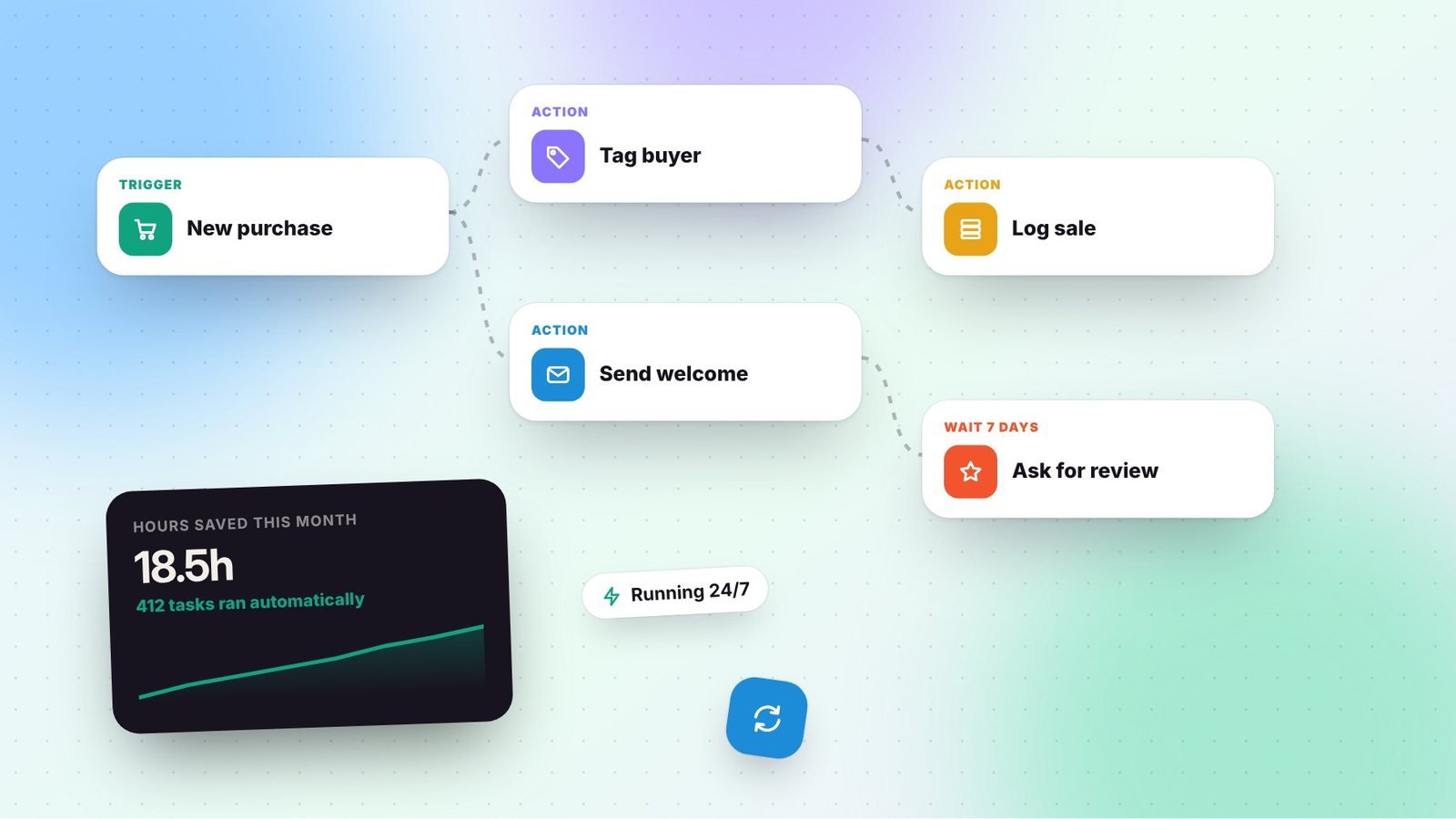
Most sales platforms deliver digital products automatically. Go further by tagging buyers in your email platform, sending an onboarding sequence, and following up a week later to ask how it’s going or to request a testimonial.
3. Content publishing
- Schedule posts in advance with native schedulers or multi-platform tools.
- Automatically share new YouTube videos or blog posts to your newsletter draft or social accounts.
- Send yourself reminders to repurpose content when a new video publishes.
4. Brand inquiry intake
Replace scattered DMs with a partnership inquiry form on your website. Automations can:
- Log every inquiry in a spreadsheet or CRM.
- Send an automatic reply with your media kit and expected response time.
- Notify you or your manager.
5. Invoicing and payment reminders
Accounting and invoicing tools can send invoices on schedule and automatically remind clients about overdue payments. This saves awkward follow-ups and improves cash flow.
6. Sales and income logging
Connect your sales platforms to a spreadsheet or accounting tool so every sale is recorded automatically. This makes monthly bookkeeping far easier. Our bookkeeping guide explains what to track.
7. Comment and DM triage
Some platforms and approved tools let you send automatic replies to keyword comments or DMs, such as sending a link when someone comments a specific word. Use these within platform rules, keep responses helpful, and avoid spammy behavior.
8. File backups
Automatically back up raw footage, project files, and important documents to cloud storage. Losing years of content to a failed drive is more common than you’d think.
Popular automation tools
| Type | Examples | Best for |
|---|---|---|
| Built-in platform automations | Email platform sequences, storefront workflows | Simple, reliable, no extra cost |
| Connector tools | Zapier, Make, n8n | Linking apps that don’t integrate natively |
| Scheduling tools | Native schedulers, multi-platform tools | Publishing content |
| Forms and databases | Google Forms, Tally, Typeform, Airtable | Collecting and organizing information |
How to set up your first automation
- Write down the manual process step by step.
- Identify the trigger (for example, “new purchase”) and the actions (“add tag,” “send email,” “add row”).
- Check for a native integration before using a connector tool.
- Test with real data, including edge cases like refunds or typos.
- Document it in a simple list: what it does, which tools it uses, and who to contact if it breaks.
Keep automations safe and healthy
- Use the minimum permissions needed when connecting apps.
- Review connected apps regularly and remove ones you no longer use.
- Turn on error notifications so you know when something fails.
- Respect privacy laws; only collect and store data you need.
- Keep a human touch. Automations should make you more responsive, not more distant.
Start with one automation that saves you time every week, then build from there. Within a few months, your business can run more smoothly, even when you’re offline. For the bigger picture, see our creator tech stack guide.
Frequently asked questions
Are automation tools safe to connect to my accounts?
Reputable tools are generally safe if you grant minimal permissions, use strong passwords and two-factor authentication, and remove connections you no longer use. Review connected apps regularly.
What should I automate first?
An email welcome sequence and automatic product delivery are great first automations because they create immediate value and save time every day.
Do I need coding skills to automate my business?
No. Many automation tools use visual, no-code builders. Start with the automations built into tools you already use before exploring connector tools.