The Content Batching System That Saves Creators 10+ Hours a Week
Learn how to batch ideas, scripts, filming, and editing into focused blocks so you publish consistently without burning out. Includes a sample weekly schedule.
Most creators don’t run out of ideas. They run out of time and energy. When you write a script on Monday, film on Tuesday, then switch back to editing, emails, and social replies in between, every task requires a fresh “warm-up.” Lights go up and come down. Your brain shifts gears a dozen times a day.
Batching fixes this by grouping similar work into focused blocks. Instead of making one piece of content from start to finish, you move a batch of content through each stage together. Done well, it can free up a full workday each week and make consistency feel much less fragile.
Key takeaways
- Batch by stage: ideate, script, film, edit, and publish in separate blocks.
- Protect a two- to four-week content buffer so a bad week doesn’t break your schedule.
- Use simple templates and checklists so each batch starts fast.
Why batching works
Context switching has a real cost. Every time you swap from creative work to admin work, it takes time to regain focus. Physical setup adds even more overhead for video creators: lighting, camera settings, audio checks, wardrobe, and cleanup can easily take an hour per shoot. Filming four videos in one session pays that setup cost once instead of four times.
Batching also improves quality. When you write four scripts in one sitting, you notice patterns, avoid repeating yourself, and build a series that flows. When you edit in a block, you develop a rhythm and reuse graphics, transitions, and music consistently.
The five stages to batch
1. Ideation (monthly, 1–2 hours)
Once a month, fill a backlog with more ideas than you need. Pull from audience comments and DMs, search autocomplete, competitor gaps, and questions from your community. Score each idea quickly on audience demand, your excitement, and business value, such as whether it leads naturally to a product or sponsor. Keep the top ideas in a single list or board.
2. Outlining and scripting (weekly, 2–4 hours)
Pick next week’s or next month’s pieces from the backlog and write them all at once. Use a consistent template: hook, promise, main points, examples, and call to action. You don’t need word-for-word scripts for every format; detailed bullet outlines work well for many talking-head creators.
3. Filming or recording (weekly or biweekly, half day)
Set up once and record everything. Keep a shot list for each piece, change shirts between videos if you want them to look like different days, and record extra B-roll and short clips while the setup is live.
4. Editing (weekly, 1–2 days or outsourced)
Edit in a block using project templates with your intro, lower thirds, color settings, and export presets already saved. If editing is your biggest bottleneck, it’s usually the first task worth outsourcing. Our guide to hiring your first editor or virtual assistant covers how.
5. Publishing and repurposing (weekly, 1–2 hours)
Write titles, descriptions, thumbnails, captions, and newsletter blurbs together. Schedule posts in advance. Then cut short clips and social posts from each main piece, which we cover in our guide to repurposing one long video into 20 pieces of content.
A sample weekly schedule
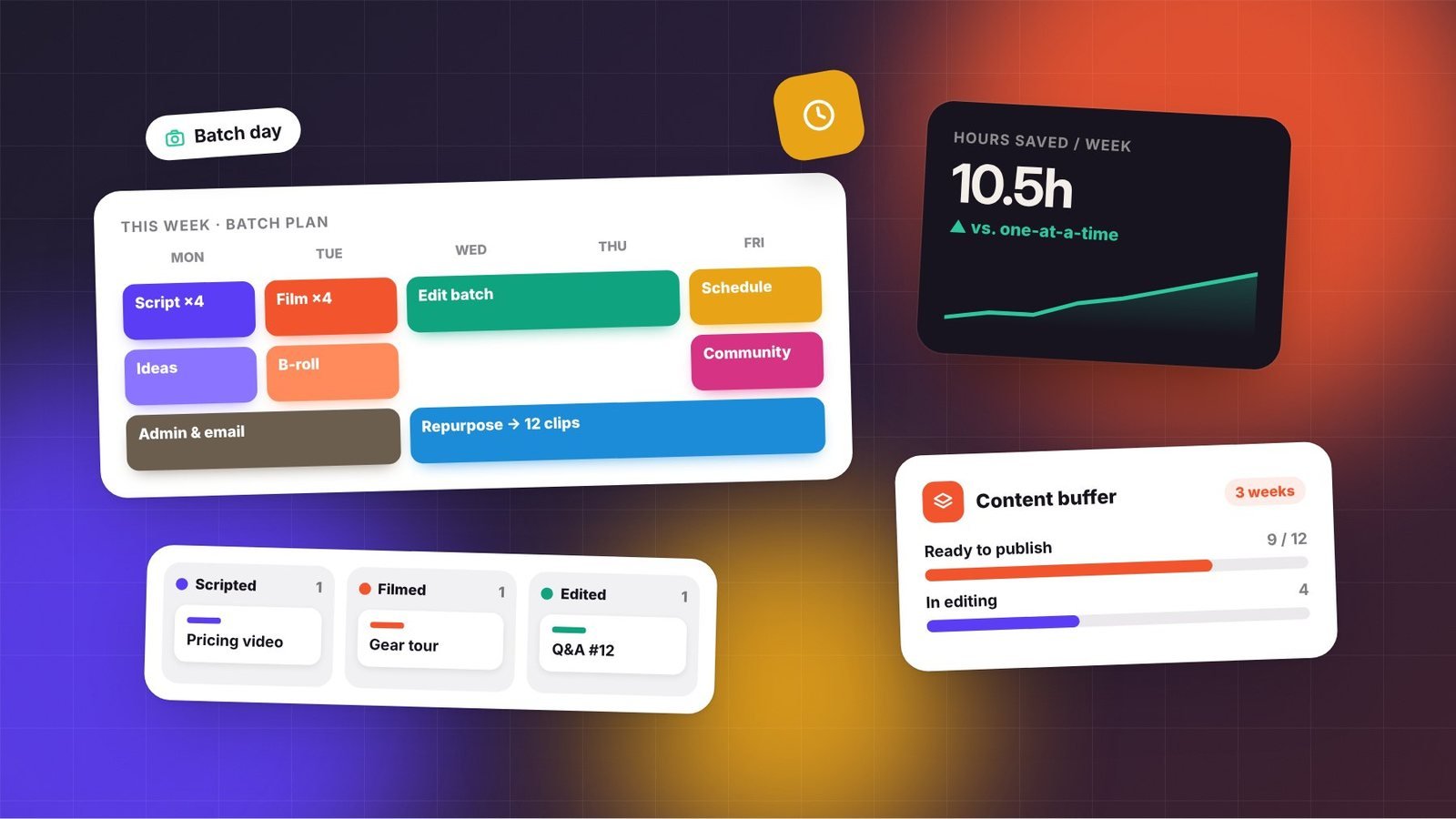
Here’s a realistic schedule for a solo creator publishing one long video, one newsletter, and several short clips each week:
| Day | Focus | Typical tasks |
|---|---|---|
| Monday | Plan & write | Script next week’s long video, outline newsletter |
| Tuesday | Film | Record the long video plus three to five short clips and B-roll |
| Wednesday | Edit | Edit the long video, export clips |
| Thursday | Publish & business | Thumbnails, titles, scheduling, sponsor emails, invoices |
| Friday | Community & buffer | Reply to comments, newsletter writing, catch-up, rest |
Notice that admin and email live in their own block. Answering messages throughout the day is one of the biggest hidden drains on creative time.
Build a content buffer
The real magic of batching appears once you get ahead. Aim to have two to four weeks of finished content ready to publish. With a buffer in place, an illness, a family emergency, or a creative slump doesn’t break your publishing streak, and you stop making rushed content under pressure.
To build a buffer, temporarily add one extra batch session per week, or publish slightly less often for a month while you produce at your normal pace. It feels slow at first, but the stress relief is worth it.
Tools that make batching easier
- A content board: Notion, Trello, Airtable, or a simple spreadsheet with columns for Idea, Scripting, Filming, Editing, Scheduled, and Published.
- Templates: script templates, editing project files, thumbnail layouts, and description boilerplate.
- A scheduler: native platform scheduling or a tool that publishes to several networks at once.
- Checklists: a pre-publish checklist prevents forgotten links, missing disclosures, or wrong thumbnails.
See our creator tech stack guide for options at every budget.
Common batching mistakes
- Batching too much at once. Filming twelve videos in a day often leads to flat energy by video eight. Start with three or four.
- Losing timeliness. Keep space in your schedule for trend-based or news-driven content that can’t wait.
- Skipping feedback. If you batch a month ahead, you may repeat a mistake four times before seeing the data. Review performance regularly and adjust upcoming batches.
- Making it rigid. Batching is a tool, not a rulebook. If you’re inspired to make something spontaneous, make it.
Start small this week
You don’t need to overhaul everything. This week, pick one stage, usually scripting or filming, and do two pieces at once instead of one. Next week, add another stage. Within a month, you’ll likely notice more focus, more consistent output, and a calendar that finally has room to breathe.
Frequently asked questions
How far ahead should I batch content?
Most creators do well with a two- to four-week buffer. That’s enough to absorb illness or travel without making content feel stale. Leave room in your schedule for timely or trend-based pieces that can’t be planned far in advance.
Does batching work for daily posting?
Yes. Daily posters often benefit the most, because the setup cost of filming or designing every day adds up quickly. Batch filming two or three times a week and scheduling posts in advance can keep a daily cadence sustainable.
What if I lose creative energy during a batch day?
Start with smaller batches of three or four pieces, schedule your most demanding work for the time of day you have the most energy, and take short breaks between pieces. Batching should reduce stress, so adjust the size until it feels manageable.